Saturday, June 17, 2017

How to Rip DVD Movies with Subtitle


Nowdays, a commercial DVD disc always include many kinds of subtitles for custom form different countries. But, when
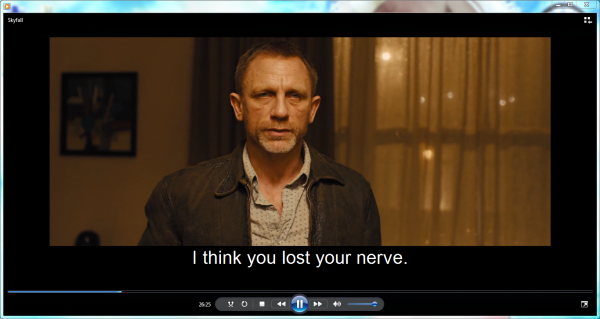
ripping DVD movies, you may want to keep the right subtitles for foreign films so that you can better understand the movie and better learn foreign language. Then how to rip DVD with the right subtitle? Here we go.


In fact, with the right program, you can easily get the work done. To rip DVD movie with the subtitles you prefer, here Dimo Video Converter Ultimate is highly recommended to help your convert your DVD movie to AVI, MP4, VOB, MKV, FLV, MOV, etc. with selected subtitles. In addition, 150+ video presets for portable media players like iPhone, iPad, iPod, HTC, PSP, Samsung, Archos, Zune, etc. are provided for your choice. If you are Mac user, please turn to Dimo Video Converter Ultimate for Mac. Below is a guide on how to do a DVD ripping with desired subtitles.

Free Download Dimo Video Converter Ultimate (Win/Mac):


Other Download: 

How to rip DVD movies with desired subtitles

Step 1. Add DVD movies

Insert the DVD disc into your DVD drive  and click the  "Add DVD" button to import the DVD files to the surface.
 

Step 2. Set up main subtitle track

Put mouse on disc main title which is selected by default, and you are able to choose subtitle stream and audio track you prefer from drop-download list.You can output DVD with different languages with the function of Multi- track MKV by the software version 3.0.1.


Step 3. Choose an output format

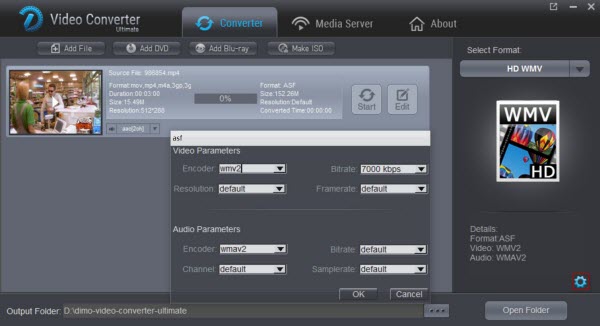
Next, click format and choose your desired format. As you can see, regular video formats like AVI, MP4, WMV, FLV, MKV, MOV, etc. are provided. Meanwhile, lots of video presets for portable devices like iPhone, iPad, iPod, etc. are offered to let you get videos with the best settings to fit your device.


Step 4. Start ripping

At last, click the "Start" tap to begin ripping your DVD movies with the subtitles you like. When the conversion finishes, click Open to locate the destination folder and just enjoy your movies!

Tip: You can rip Blu-ray movies with desired subtitle to MP4, FLV, AVI, iPad, iPhone, HTC, etc. 

Free Download or Purchase Dimo Video Converter Ultimate:


Need the lifetime version to work on 2-4 PCs so that your friends and family can instantly broaden their entertainment options? Please refer to the family license here


Kindly Note:

The price of Dimo Video Converter Ultimate for Windows is divided into 1 Year Subscription, Lifetime/Family/Business License: $43.95/Year; $45.95/lifetime license; $95.95/family license(2-4 PCs); $189.95/business pack(5-8 PCs). Get your needed one at purchase page.

Related Software:

BDmate (Win/Mac)

Lossless backup DVDto MKV with all audio and subtitle tracks; Rip DVDto multi-track MP4; ConvertDVDto almost all popular video/audio formats and devices; Copy DVDto ISO/M2TS; Share digitized DVDwirelessly.

DVDmate (Win/Mac)

A professional DVD ripping and editing tool with strong ability to remove DVD protection, transcode DVD to any video and audio format, and edit DVD to create personal movie.

Videomate (Win/Mac)

An all-around video converter software program that enables you to convert various video and audio files to formats that are supported by most multimedia devices.

8K Player (Win/Mac)

A mixture of free HD/4K video player, music player, Blu-ray/DVD player, video recorder and gif maker. 

Contact us or leave a message at Facebook if you have any issues.

Related Articles:

Thursday, June 15, 2017

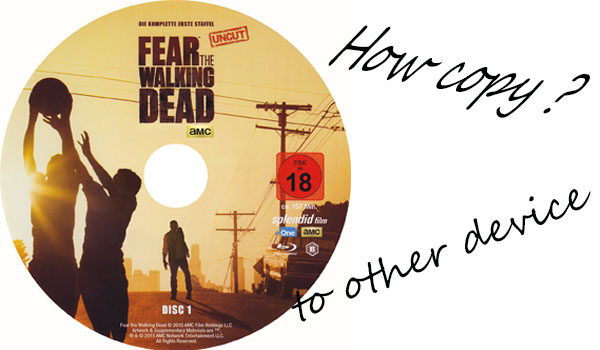
How to Rip and Copy Fear The Walking Dead Season 3?


Fear the Walking Dead returns for a third season, as the survivors arrive at the U.S. border to escape the many dangers of a zombie-infested Mexico. The problem is that they're going to have a very tough time getting back into the country. A vigilante patrol awaits them at the border, ready to stop anyone from coming back in. If you love this TV, you must buy Fear The Walking Dead Season 3 DVD. If you want to copy the DVD for watching anywhere and anytime, you can read the following part.


A professional DVD ripper is in need to rip DVD for enjoying all episodes of this amazing zombie TV series on portable devices with no hassle at all. Dimo Video Converter Ultimate, one of leading DVD ripper in the market, is capable of ripping any DVD to MP4, H264, AVI, WMV, MOV etc, and fashionable devices, like iPhone 7/7 Plus, iPad Air 2/Mini 3, Samsung Galaxy Note/S series, Google Nexus series, Kindle Fire, PS3/4, Xbox One/360 etc, at a very high speed. 

It is powerful on removing any copy-protections on latest released DVD movies and TV shows (e.g. The Hobbit: The Battle of the Five Armies, The Hunger Games: Mockingjay - Part 1, Big Hero 6) and deliver possible highest audio/video quality. Moreover, it is available to copy/backup DVD to VIDEO_TS folder and a single mkv file at 1:1 ratio. If you are Mac user,please turn to Dimo Video Converter Ultimate for Mac.

Free Download Dimo Video Converter Ultimate (Win/Mac):


Other Download: 

The fllowing step will tell you how to copy DVD

Step 1. Insert DVD of Fear The Walking Dead Season 3 into DVD-ROM on your computer and click "Add DVD" Disc button to import DVD source to Dimo Video Converter Ultimate.  


Step 2. Output Profile window will pop up for output format selection and main title will be automatically checked once all contents are loaded. Move to Apple Device – to iPhone Video – iPhone 7, Plus (MPEG4/H264). Also you can 1:1 backup DVD to Video_ts folder and copy DVD to lossless mkv with all subtitle and audio track preserved.


Step 3. Save the ripped TV series to destination folder if necessary and click "Start" button to rip DVD The Walking Dead.

Tip: You also can adjust audio/video parameters depending on your own needs as well as edit video by trimming, cropping, rotating, adding watermark/effects.

Free Download or Purchase Dimo Video Converter Ultimate:


Need the lifetime version to work on 2-4 PCs so that your friends and family can instantly broaden their entertainment options? Please refer to the family license here


Kindly Note:

The price of Dimo Video Converter Ultimate for Windows is divided into 1 Year Subscription, Lifetime/Family/Business License: $43.95/Year; $45.95/lifetime license; $95.95/family license(2-4 PCs); $189.95/business pack(5-8 PCs). Get your needed one at purchase page.

Related Software:

BDmate (Win/Mac)

Lossless backup Blu-ray to MKV with all audio and subtitle tracks; Rip Blu-ray to multi-track MP4; ConvertBlu-ray to almost all popular video/audio formats and devices; Copy Blu-ray to ISO/M2TS; Share digitized Blu-ray wirelessly.

DVDmate (Win/Mac)

A professional DVD ripping and editing tool with strong ability to remove DVD protection, transcode DVD to any video and audio format, and edit DVD to create personal movie.

Videomate (Win/Mac)

An all-around video converter software program that enables you to convert various video and audio files to formats that are supported by most multimedia devices.

8K Player (Win/Mac)

A mixture of free HD/4K video player, music player, Blu-ray/DVD player, video recorder and gif maker. 

Contact us or leave a message at Facebook if you have any issues.

Related Articles:

Monday, June 12, 2017

How to Watch Blu-ray on Chromebook

Part I: Why Chromebook Plus/Pro can't play Blu-ray files

Google, Samsung, Acer, HP, Asus, Toshiba, Lenovo all have released or will release their own Chromebook laptops. A Chromebook is a laptop running Chrome OS as its operating system. The devices are designed to be used primarily while connected to the Internet, with most applications and data residing "in the cloud". By connecting to the Google Drive, Chromebook allows you to store all of your videos, music and pictures. However, currently Chrome OS doesn't support the video codecs for Blu-ray Discs. If you wanna play Blu-ray on Chromebook, the easy and possible way is to convert Blu-ray to Chromebook compatible video files.


Part II: How to convert and play Blu-ray on Chromebook Plus/Pro 

Nowadays, it is easy to watch Blu-ray video on Chromebook Plus/Pro without quality loss as long as you got a Blu-ray Ripping tool like Dimo Video Converter Ultimate in hand, which occupies the dominance over the rest due to its practical features, high quality & fast speed, coupled with ease of use. This program can professionally rip Blu-ray to Chromebook Plus/Pro supported video format with fast speed and excellent output quality. It will help you remove all the restrictions of Blu-ray, like AACS, Region code, BD+, latest MKB. If you're a Mac user, you can turn to Dimo Video Converter Ultimate for Mac. Just download the right program and follow the easy steps to complete the whole conversion in just a few clicks.

Free Download Dimo Video Converter Ultimate (Win/Mac):


Other Download: 
The following steps will hlep you paly Blu-ray on Chromebook Plus/Pro

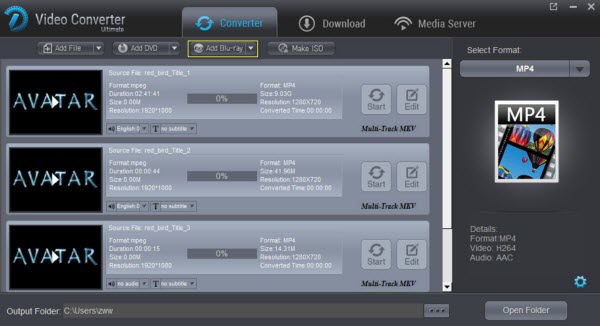
Step 1: Insert your Blu-ray disc into the Blu-ray drive and click "Add Blu-ray" to load the Blu-ray content.


Step 2: Just select an output format as you like.

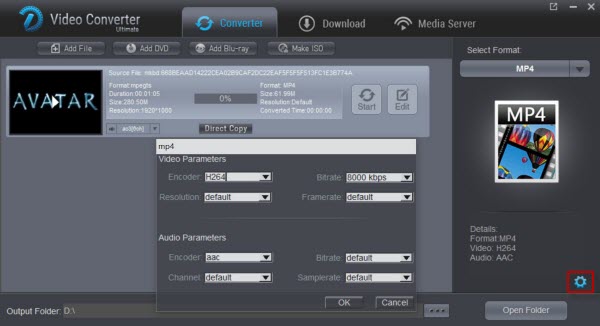
In most cases, MP4 formats is recommended to users. Moreover, you can choose foreign language subtitles which you want to view, select the audio channel, trim/crop the movie video, reset the default video parameters/ripping speed etc. as you like. If you want custom you Blu-ray, you can hit the “Edit” button and y ou can trim/crop the movie video, adjust the effect etc. as you like. Finally, you can click the "setting" to choose the resolution that you want.


Step 3:  Hit "Start" to set the Blu-ray to Chromebook Plus/Pro formats ripping out. After successful ripping, you can transfer the ripped movie video to Chromebook Plus/Pro with USB flash disk and then play watch movie on Chromebook Plus/Pro at leisure time. Besides, this Blu-ray Ripper also support the another format of video such as DVD, VOB, MP4, etc.

Free Download or Purchase Dimo Video Converter Ultimate:


Need the lifetime version to work on 2-4 PCs so that your friends and family can instantly broaden their entertainment options? Please refer to the family license here


Kindly Note:

The price of Dimo Video Converter Ultimate for Windows is divided into 1 Year Subscription, Lifetime/Family/Business License: $43.95/Year; $45.95/lifetime license; $95.95/family license(2-4 PCs); $189.95/business pack(5-8 PCs). Get your needed one at purchase page.

Related Software:

BDmate (Win/Mac)

Lossless backup Blu-ray to MKV with all audio and subtitle tracks; Rip Blu-ray to multi-track MP4; ConvertBlu-ray to almost all popular video/audio formats and devices; Copy Blu-ray to ISO/M2TS; Share digitized Blu-ray wirelessly.

Blu-raymate (Win/Mac)

A professional Blu-ray ripping and editing tool with strong ability to remove Blu-ray protection, transcode Blu-ray to any video and audio format, and edit Blu-ray to create personal movie.

Videomate (Win/Mac)

An all-around video converter software program that enables you to convert various video and audio files to formats that are supported by most multimedia devices.

8K Player (Win/Mac)

A mixture of free HD/4K video player, music player, Blu-ray/Blu-ray player, video recorder and gif maker. 

Contact us or leave a message at Facebook if you have any issues.

Related Articles:

Thursday, June 8, 2017

Editing 4K MP4/MOV from Panasonic GH5 4K in Davinci Resolve

If you recorded some videos by the new Panasonic  GH5, you may like editing these 4K files in mp4 or mov format.But, if you importPanasonic GH5 4K videos into Davinci Resolve, users always encounter video and audio problems, as the H.264 codec from GH5 is efficient, but simply isn't designed for editing. In addition, although Davinci Resolve has boasted the capacity to handle with 4K files without much problem, it is extremely hardware intensive especially for working on a old computer. So, before transferring Panasonic GH5 4K files to Davinci Resolve, you'd better convert GH5 4K MP4/MOV to 1080p DNxHD for smooth editing. 


Along with some help from a top 4K video converter like Dimo Video Converter Ultimate for Mac, it can be done quickly and easily. It is capable of converting Panasonic GH5 MP4/MOV to DNxHD, MPEG-2, WMV for smoothly importing and editing in various non-linear editing systems (NLE), including DaVinci Resolve 9/10/11/12, Avid Media Composer 5.5/6.0/6.5/7/8, Adobe Premiere Pro, Sony Vegas, Windows Movie Maker and more. If you are Mac user, please turn to Dimo Video Converter Ultimate. And this article will present you how to load 4K MP4/MOV from Panasonic GH5 in Davinci Resolve in detail.  

Free Download Dimo Video Converter Ultimate for Mac/Win:


Other Download: 

How to convert and import Panasonic GH5 4K files to Davinci Resolve 

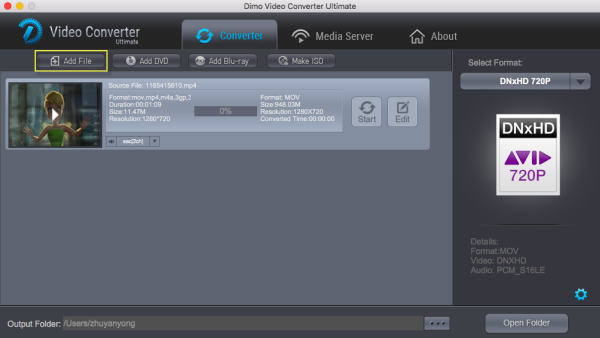
Step 1. Install and launch the Panasonic GH5 4K Video converter. Click the "Add File" button to import your mp4 or mov videos to the program. Dragging or dropping you file into the product also can be marked.   


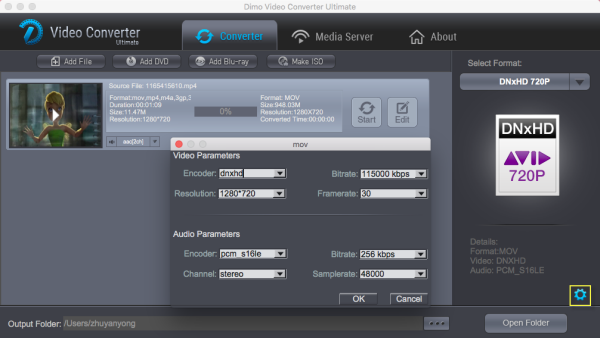
Step2. Click the format bar and move mouse cursor "Editor". Here we recommend the "Avid DNxHD 720P/1080P "as the best video format. 

Tip: You can click "Settings" button to adjust the resolution, 3D effect, etc. Just customize the parameters to meet your need. 


Step 3. Click "Start" button to start converting Panasonic GH5 4K video to DNxHD for importing to Davinci Resolve. After the conversion is finished, just run Davinci Resolve and import the generated DNxHD .mov files. You will find the output video works perfectly on DaVinci Resolve 9/10/11/12.

Free Download or Purchase Dimo Video Converter Ultimate for Mac/Win:


Need the lifetime version to work on 2-4 Macs so that your friends and family can instantly broaden their entertainment options? Please refer to the family license here


Kindly Note:

The price of Dimo Video Converter Ultimate for Mac is divided into 1 Year Subscription, Lifetime/Family/Business License: $43.95/Year; $45.95/lifetime license; $95.95/family license(2-4 Macs); $189.95/business pack(5-8 Macs). Get your needed one at purchase page.

Related Software:

BDmate (Mac/Win)

Lossless backup Blu-ray to MKV with all audio and subtitle tracks; Rip Blu-ray to multi-track MP4; Convert Blu-ray to almost all popular video/audio formats and devices; Copy Blu-ray to ISO/M2TS; Share digitized Blu-ray wirelessly.

DVDmate (Mac/Win)

A professional DVD ripping and editing tool with strong ability to remove DVD protection, transcode DVD to any video and audio format, and edit DVD to create personal movie.

Videomate (Mac/Win)

An all-around video converter software program that enables you to convert various video and audio files to formats that are supported by most multimedia devices.

8K Player (Mac/Win)

A mixture of free HD/4K video player, music player, Blu-ray/DVD player, video recorder and gif maker.

Contact us or leave a message at Facebook if you have any issues.

Related Articles:

Thursday, June 1, 2017

Guide to download Top 10 children's day Disney Movies


Children's day is a good day to watch cartoons. This is the list of top ten Disney movies in 2016. This article also provides tips on how to download these movies.
Children's day is coming! At this day everyone want to review the feeling of childhood or give their kids some surprise. Anime is a good choice. Did you miss some good anime movies in 2016? How about the best Disney cartoons? Here we list out top 10 Disney movies for you guys for reference.
There's nothing that brings the family together more than gathering around the television for Disney cartoons. All of the Internet places here offer free steaming movies for kids and the whole family. Also if you like, you can download them through the free movie downloader - Dimo Video Converter Ultimate for Mac to have full-length animated movies for your kids to watch on your iPad, iPhone, Android etc. without bandwidth limitation.
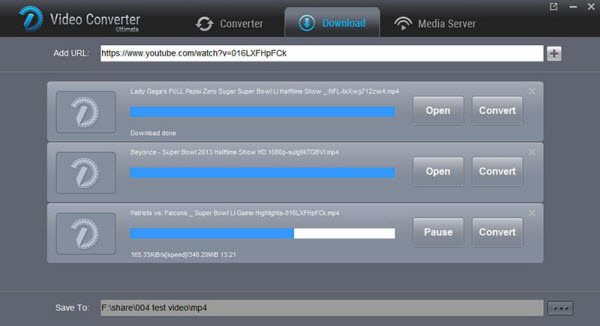
With it, you can also do batch conversion from any video to MP4, AVI, FLV, WMV, MKV, H.265, etc. video files on Mac (OS Sierra) with fast encoding speed and high output quality. It lets you enjoy the thrill of video/audio conversion between various formats. What you can achieve from this onverter doesn't limit in here. Its built-in editor allows you to adjust the video effects for better visual enjoyment. Apart from that, it can also make ISO from any videos for backup without compressing any image quality. Moreover, you can download online videos from 300+ popular sites like YouTube, BBC, Vimeo, Facebook, etc.  If you are the user of Windows computer, simply turn to Dimo Video Converter Ultimate to convert videos for using on Win.
Free Download Dimo Video Converter Ultimate for Mac/Win:
         
Other Download:
1. Zootopia
Time: March 4, 2016
Zootopia is a story about a fox (Jason Bateman) and a rabbit (Ginnifer Goodwin). In a city of anthropomorphic animals, a rookie bunny cop and a cynical con artist fox must work together to uncover a conspiracy. At the end of the story, the enemies become friends.
Thanks to its interesting plot and good message, Zootopia turns out to be 2016's first best Disney movie. Moreover, the film won the Critics' Choice Movie Award for Best Animated Feature, and the Golden Globe for Best Animated Feature Film.

2. The Jungle Book
Time: April, 2016
The Movie is based on a collection of stories written by English author Rudyard Kipling. The story is about the adventure in the jungle of a boy who was raised by a wolf family. After a threat from the tiger Shere Khan forces him to flee the jungle, a man-cub named Mowgli embarks on a journey of self discovery with the help of panther, Bagheera, and free spirited bear, Baloo. The live-action and CGI animation combo makes the movie a spectacular visual feat for people of all ages.

3. Captain America: Civil War
Time: May, 2016
Captain America: Civil War, a new clip of Captain America, is produced by Marvel Studios and distributed by Walt Disney Studios Motion Pictures in 2016. Political interference in the Avengers' activities causes a rift between former allies Captain America and Iron Man.
In the movies, the government decides to limit superhero's actions since many people are afraid of super heroes. However, this action causes a division in The Avengers. Team Iron Man (Iron Man, Black Panther, Vision, Black Widow, War Machine, and Spider-Man) believe that their actions must be kept in check otherwise cities will continue to be destroyed, while Team Captain America (Captain America, Bucky Barnes, Falcon, Scarlet Witch) insist that they have to save the world by themselves instead of the unreliable government.
This fantastic super-hero movie became a critical and commercial success, making it the highest-grossing film of 2016 and the 12th highest-grossing film of all time.

4. Alice Through the Looking Glass
Time: May, 2016
Alice returns to the whimsical world of Wonderland and travels back in time to help the Mad Hatter. 6 years after the first remake –Alice in Wonderland, the new sequel - Alice Through the Looking Glass finally hit theaters.
In the new story, Alice returns to the Wonderland and save the Mad Hatter, featuring the old faces and new characters. This movie reunites so many famous celebrities from all over the world, including: Johnny Depp, Anne Hathaway, Mia Wasikowska and Helena Bonham Carter, etc.

5. Finding Dory
Time: June, 2016
Finding Nemo was a big success. 13 years after, the new sequel finally arrives. The new movie brings both familiar faces and new characters. The friendly but forgetful blue tang fish, Dory, begins a search for her long-lost parents, and everyone learns a few things about the real meaning of family along the way.
In this movie, the forgetful blue tang Dory is going to looking for her family with the help of Marlin, Nemo, and other friends - Hank (an octopus), Bailey (a beluga whale), and Destiny (a whale shark). Their adventure is full of fun and love! Produced by Pixar Animation Studios and released by Walt Disney Pictures, this long-awaited Disney movie is perfect for kids.

6. The BFG
Time: July, 2016
The BFG stands for "Big Friendly Giant". The movie is based on a children's book written by British novelist Roald Dahl and illustrated by Quentin Blake. An orphan little girl befriends a benevolent giant who takes her to Giant Country, where they attempt to stop the man-eating giants that are invading the human world.
In the story, Sophie, a little girl encounters the Big Friendly Giant, who turns out to be kind-hearted. Unlike other giants, this friendly giant refuses to eat children. Gradually, the little girl and the giant become friends.

7. Pete's Dragon
Time: August, 2016
Pete's Dragon is a remake of the 1977 musical film of the same name written by Malcolm Marmorstein. The movie is based on the classic children's story about an orphaned boy who grows up in the jungle with his giant, green dragon friend named Elliot. The adventures of an orphaned boy named Pete and his best friend Elliot, who just so happens to be a dragon.

8. Moana
Time: November, 2016
Moana, the newest Disney princess and the first Polynesian princess, is brave enough to start an epic journey to save her family. During her journey, she encounters enormous monsters and impossible odds.
In Ancient Polynesia, when a terrible curse incurred by the Demigod Maui reaches an impetuous Chieftain's daughter's island, she answers the Ocean's call to seek out the Demigod to set things right.
This movie also brings the best Disney music with a traditional animated musical from Disney. This story definitely breaks more racial barriers and diversify the Disney princess realm.

9. Doctor Strange
Time: November, 2016
While on a journey of physical and spiritual healing, a brilliant neurosurgeon is drawn into the world of the mystic arts. Doctor Strange (Benedict Cumberbatch) was a talented but self-involved surgeon. After a car accident, he can no longer perform surgery since his hands were destroyed. He decides to embark on a journey of healing and finally be drawn into the world of the mystic arts.

10. Rogue One: A Star Wars Story
Time: December, 2016
Rogue One: A Star Wars Story is an epic space opera film. The main character - Jyn Erso is daughter of the unwilling designer of the Galactic Empire's superweapon the Death Star. She has a mission to retrieve the schematics so the Death Star can be destroyed. The movie might be better than it's expected to be.The Rebel Alliance makes a risky move to steal the plans for the Death Star, setting up the epic saga to follow.
Rogue One received many positive reviews and make it the fourth highest-grossing film of 2016.

After reading the list of best Disney cartoon movies, you might want to download them and even copy them to your portable devices (like iPhone, Google android phone, Samsung Tablets, etc.) so that you can enjoy them anywhere you want. To download these movies in the easiest way, we would like to recommend you to use a video downloader namely Dimo Video Converter Ultimate for Mac.
What can Dimo Video Converter Ultimate do?
  • Video Converter Ultimate will help you download the top ten Disney movies 2016 freely from YouTube, Dailymotion, Metacafe, etc.
  • Very easy to download any videos from any site: by pasting URL or by clicking the download plug-in.
  • Convert the downloaded Disney movies to MP4, 3GP, AVI, MKV, MOV, and other 100+ different format.
  • It has preset output options for iPhone, iPad, iPhone, Android tablets and even game console.
Free Download or Purchase Dimo Video Converter Ultimate for Mac/Win:
         
Need the lifetime version to work on 2-4 Macs so that your friends and family can instantly broaden their entertainment options? Please refer to the family license here.
Kindly Note:
The price of Dimo Video Converter Ultimate for Mac is divided into 1 Year Subscription, Lifetime/Family/Business License: $43.95/Year; $45.95/lifetime license; $95.95/family license(2-4 Macs); $189.95/business pack(5-8 Macs). Get your needed one at purchase page.
Contact us or leave a message at Facebook if you have any issues.
Related Articles:

source:


  • Guide to download Top 10 Disney Movies 2016
  • Thursday, May 25, 2017

    AE 4K Solution - How to Import 4K Ultra HD video to After Effects

    With the 4K resolution camera into the hands of consumers, editing 4K video demand has become the mainstream. In fact, 4K movies are limited to edited in After Effects. Only the latest version of Adobe After Effects CC can native support 4K video. Previous versions of After Effects CS6/CS5/CS4 have not been updated to 4K support. In addition, due to format restrictions, we can not perfect editing After Effects in a variety of 4K video files, such as 4K MP4, 4K MOV, 4K MXF, 4K XAVC, 4K Prores, and so on. What if you are having problems editing a 4K clip in After Effects? Read on to find something you need.


    To resolve 4K and After Effects issues, the quick and easy workaround is to transcode the 4K videos to After Effects compatible videos and even downscale 4K to 1080p if necessary. The process is surprisingly easy and can be done with the help of Dimo Video Converter Ultimate for Mac . Overall, the program is the best 4K video converter for handling 4K videos. With this program, you can effortlessly transcode 4K video to MOV or MPEG-2, which will create an After Effects (also for Premiere Pro, Premiere Elements) friendly file format keeping the 4K original quality. 

    Besides After Effects, this software can also export DNxHD for Avid, Apple ProRes for Final Cut Pro, Apple InterMediate Codec for iMovie and more NLE systems for native editing or output H.264 for playing on iPhone, iPad, Android, Android, etc.. Plus, this fastest video converter also enables you to downscale videos resolution without notice the difference by your eyes, along with custom video bitrate, frame rate to get your desired output video size, for uploading your 4k to YouTube, Vimeo etc. If you are the user of Windows computer, simply turn to Dimo Video Converter Ultimate to convert and transfer 4k videos on Win.

    Free Download Dimo Video Converter Ultimate for Mac/Win:


    Other Download: 
    How to convert and import 4K video into After Effects

    Step 1. Load source 4K videos

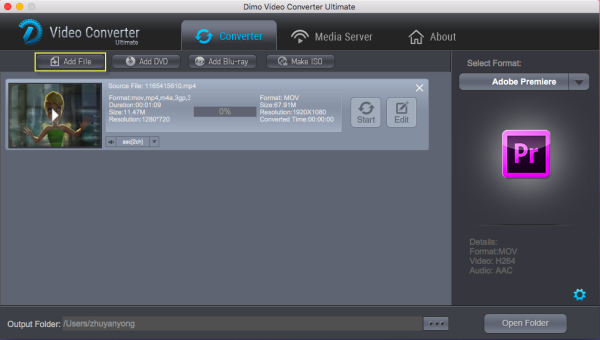
    Launch the 4K video converter, and then click "Add File" and load your 4K HD files. This program supports batch conversion, so you can add multiple files into it at a time.


    Step 2. Choose the output format

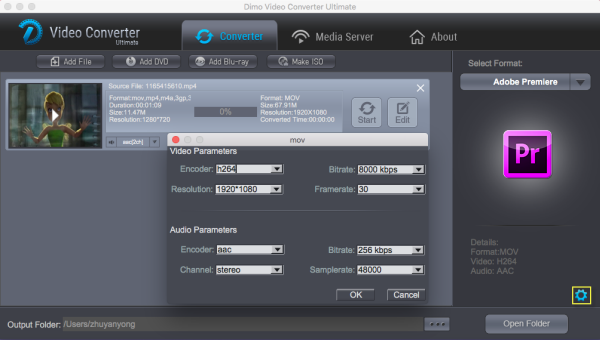
    To encode 4K to After Effects, you can choose "Adobe Premiere" from "Editor" or select MOV, WMV or MPEG-2 from "Format > Video" as the output format. All output videos will keep the original quality of 4K video and seamlessly fit After Effects CC, CS6, CS5.5, CS5, CS4 and more.

    Tip: Adjust video and audio settings

    Click "Settings" button and customize proper video/audio parameters including Video size, bitrate and fame rate and more. If you are using After Effects CS6/CS5/CS4 which does not fully support native 4K files, 1080p would be the best settings. Of course, if you wanna get a 4K workflow in After Effects CC, you can keep the original 4K video resolution.


    Step 3. Start converting 4K video to AE

    Hit the "Start" button and this 4K file Converter for Mac will convert your 4K video for AE rapidly. After the conversion, you can import the output files to Adobe Effects CC/CS6/CS5/CS4 without any trouble.

    In addition, this great Mac 4k video converter also allows you to fast share converted 4K file to from Mac or Win computer to mobile devices wirelessly, via its mature IP address sharing technology (i.e. Dimo Media Server). What's more, you can even convert edited videos export from editors into more popular formats. Congratulations! You have successfully taken the first step to make your own masterpiece.

    Free Download or Purchase Dimo Video Converter Ultimate for Mac/Win:


    Need the lifetime version to work on 2-4 Macs so that your friends and family can instantly broaden their entertainment options? Please refer to the family license here


    Kindly Note:

    The price of Dimo Video Converter Ultimate for Mac is divided into 1 Year Subscription, Lifetime/Family/Business License: $43.95/Year; $45.95/lifetime license; $95.95/family license(2-4 Macs); $189.95/business pack(5-8 Macs). Get your needed one at purchase page.

    Contact us or leave a message at Facebook if you have any issues.

    Related Articles:

    Tuesday, May 23, 2017

    How to Play Tivo in Windows Media Player


    Windows Media Player can’t play Tivo natively. Here, I provide you with several feasible solutions to help you play Tivo in Windows Media Player smoothly.

    TiVo has been the most widely used tool to record TV shows, movies or stream videos on TV for enjoy. As a matter of fact, it is quite hard to load Tivo to Windows Media Player for playback since the TiVo has its unique copy protection which forbid you to playback them smoothly. This article discusses an easy way to get TV shows off TiVo and converting them to WMV format videos for playback with Windows Media Player.


    To play TiVo files in Windows Media Player, the easy solution is to convert TiVo shows to WMV, the best format for Windows Media Player. There are some free programs can assist you to remove commercials from Tivo recordings, one of them is the Perl program KMTTG, but you may find the process is too complicated or operate.

    If you want to find a more simple to use video converter application, you can try Dimo Video Converter Ultimate. The program can help you effortlessly remove DRM protection automatically while converting TiVo files into WMV for Windows Media Player with fast encoding speed and zero quality loss. You could get wonderful output files and never worry about out of audio/video sync. Besides, the program's "Trim" function lets you simply remove commercials from TiVo recordings.

    Not only Tivo files, this all-in-one software can rip Blu-ray/DVD to WMP for playback. If you're using a Mac, please turn to the Mac version. Now, download the right program and follow the step-by-step guide to learn how to remove protection/commercials from TiVo Recordings and get them playback on Windows Media Player.

    Free Download Dimo Video Converter Ultimate (Win/Mac):


    Other Download:

    How to convert TiVo to WMP easily and quickly

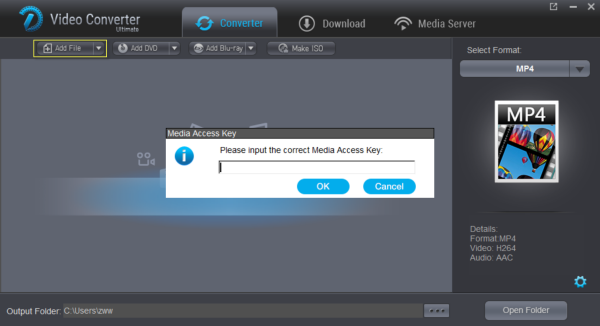
    Step 1. Install the TiVo converter program and run it. Drag and drop the TiVo files to the software. Or you can also click “Add file” button on the top of the main interface to import video to the app.

    Tip: When first loading, this software will ask you to input your Media Access Key. Simply enter your Media Access Key, and click “OK” to confirm.


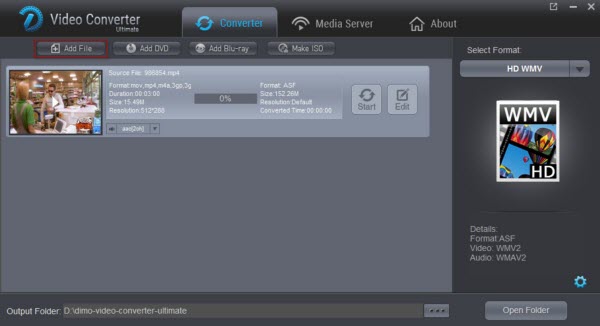
    Step 2. Click "Select Format" bar and select "HD WMV" as target format from "Format > HD Video". Or choose a common used MP4 format for playing on all players and devices.


    Tip:

    a. To adjust video and audio parameters like codec, aspect ratio, bit rate, frame rate, sample rate, you could click on "Settings" button.


    b. The smart TiVo file converter additionally offers some useful edit functions to enhance your video. For example, you can click the Edit button to enter the Video Editor Window and then trim the video.

    From the Trim workspace, you can create a custom clip from a larger scene. To adjust the duration of your clip, move the sliders below the screen to the start and end points you want.

    Step 3. Click "Start" button to start transcoding TiVo to WMV for WMP. Once the conversion finished, click the Open button and you can locate the output files effortlessly. And then you can add and play the converted TiVo shows with Windows Meia Player with ease. Hopefully it helps. There you go, that's how you can play TiVo files using Windows Media Player!


    Editor’s Notes: If you haven’t got TiVo files ready on your Mac, and have no idea how to transfer TiVo files to Mac, just follow the steps:

    1.Connect TiVo to Network
    2. Make your Mac is on your network and launch TiVoDecode Manager.
    3. Check your TiVo on network.
    4. Transfer TiVo files to Mac

    Free Download or Purchase Dimo Video Converter Ultimate:


    Need the lifetime version to work on 2-4 PCs so that your friends and family can instantly broaden their entertainment options? Please refer to the family license here.


    Kindly Note:

    The price of Dimo Video Converter Ultimate for Windows is divided into 1 Year Subscription, Lifetime/Family/Business License: $43.95/Year; $45.95/lifetime license; $95.95/family license(2-4 PCs); $189.95/business pack(5-8 PCs). Get your needed one at purchase page.

    Related Software:

    BDmate (Win/Mac)

    Lossless backup Blu-ray to MKV with all audio and subtitle tracks; Rip Blu-ray to multi-track MP4; ConvertBlu-ray to almost all popular video/audio formats and devices; Copy Blu-ray to ISO/M2TS; Share digitized Blu-ray wirelessly.

    DVDmate (Win/Mac)

    A professional DVD ripping and editing tool with strong ability to remove DVD protection, transcode DVD to any video and audio format, and edit DVD to create personal movie.

    Videomate (Win/Mac)
    An all-around video converter software program that enables you to convert various video and audio files to formats that are supported by most multimedia devices.
    8K Player (Win/Mac)

    A mixture of free HD/4K video player, music player, Blu-ray/DVD player, video recorder and gif maker.

    Contact us or leave a message at Facebook if you have any issues.

    Related Articles: